HTML report
pip install "wintegrate[html]" and run pytest with --html=report.html. The
row for every test that opened a Session then carries the session's evidence,
read from the artifacts the session already writes. Nothing changes in what a
session records; the plugin is loaded through the pytest11 entry point and
stays inert without --html.
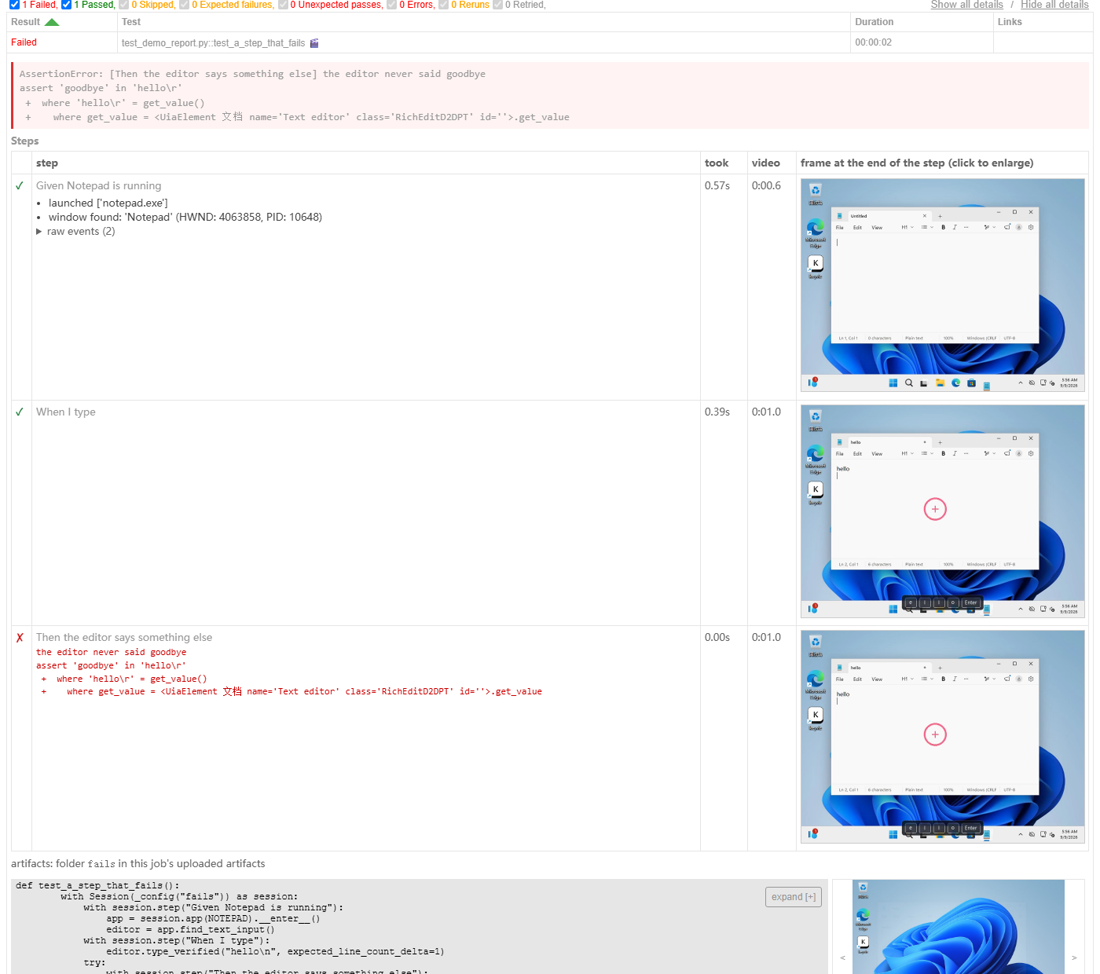
What a failed row shows, in order
- The last screenshot, in the media pane, before anything has to be
expanded. The step's own
failure-<step>.pngwhen the failure was inside asession.step, otherwise the session'sfailure_screenshot.png. - The error, one line: the exception's own message (not the file and line, which the traceback below already gives).
- The steps, one row each: tick or cross, the step's name, how long it took, where it sits in the video, and the frame the recording holds at the end of the step -- the result, or the moment it failed. A failed step shows the exception's message. Steps nest the way they ran; the events inside each are listed as plain sentences, with the raw journal lines a click away. Clicking a frame enlarges it in place.
- The recording, as a video the report plays.
A passing row has the same steps table, collapsed with the row. Rows that carry sessions are marked 🎬 in the results table, and the summary lists them, so they can be found in a long report where every passing row is collapsed.
The order is the one that lets a failure be read without expanding anything: Playwright's report opens on the last screenshot for the same reason. One frame per step is Maestro's device; the nested steps with their events are Allure's step tree and Robot's keyword log.
Where it comes from
| In the row | Read from |
|---|---|
| steps, nesting, durations, signatures | step_start / step_ok / step_failed in session_events.jsonl |
| events inside a step | every other journal line, by its step |
| frame per step | session_recording.mp4 at the time recording_anchor.json maps the step start to |
| screenshot | newest failure*.png in the artifact directory |
| video | session_recording.mp4, copied into the report's assets/ by pytest-html |
The frames need the video extra (PyAV); without it the table has no
thumbnails and everything else is unchanged. --self-contained-html inlines
screenshots and frames; the video is then inlined as well and the file grows
accordingly.
Using it in your own suite
Nothing to register. Open sessions with Session(...) inside the test, wrap
work in session.step("...") so the table has rows, and pass --html. Several
sessions in one test each get their own block.
GitHub Actions Step Summary
When running inside GitHub Actions, wintegrate automatically writes session
diagnostics directly to $GITHUB_STEP_SUMMARY:
- High-priority failure callout (
> [!CAUTION]): failed sessions prominently display the failure error and the step where the failure occurred at the top of the section. - Collapsible passed sessions (
<details>): successfully completed sessions are collapsed by default with their step counts and durations, keeping the Actions job summary clean. - Window leak warnings (
> [!WARNING]): warns if unclosed window handles remained open at session exit based onwindow_census.json. - Suite-level overview table: pytest test suites conclude with an aggregated overview table summarizing total sessions, passed/failed counts, and direct pointers to failure artifact directories.